


A super easy way to pick up Amazon orders 24/7 while you’re traveling in Japan.
I recently picked up an Amazon Japan order from a FamilyMart using their FamiLocker, and it was surprisingly easy. No need to talk to staff, show ID, or feel awkward asking your hotel to hold a package—just scan the QR code from your email and the locker pops open. It was so smooth, I had to share how it works.
How to collect your package from a FamiLocker:
Introduction
FamilyMart is a major convenience store chain in Japan, with locations found almost everywhere. You’ll rarely be more than a few minutes’ walk from one, and with many stores open 24/7, FamiLockers at FamilyMart make it easy to pick up Amazon orders anytime.
If you’re wondering why you might make an Amazon order while traveling in Japan, it’s because many Japanese products aren’t available for international shipping. And while there are plenty of online stores in Japan, Amazon is one of the few that delivers to FamiLockers.
So if you already know what you want, having it delivered nearby saves you valuable time by skipping the hassle of searching through stores. You can even plan for it to arrive at the most convenient spot during your trip.

When placing your Amazon Japan order, select a FamiLocker (ファミロッカー) as your pick-up point. You can type in your hotel location and choose the closest FamiLocker from a map.
This post will focus on how to pick up your order from a FamiLocker. For instructions on how to set up your pickup location on Amazon, please refer to:

When your package arrives at the locker, you’ll receive an email from Amazon that includes:
- A QR code for pickup
- A pickup deadline (usually 3 days from delivery)
- A backup code in case the QR doesn’t scan
How to collect your package from a FamiLocker
🏪 Step 1: Go to the Family Mart store
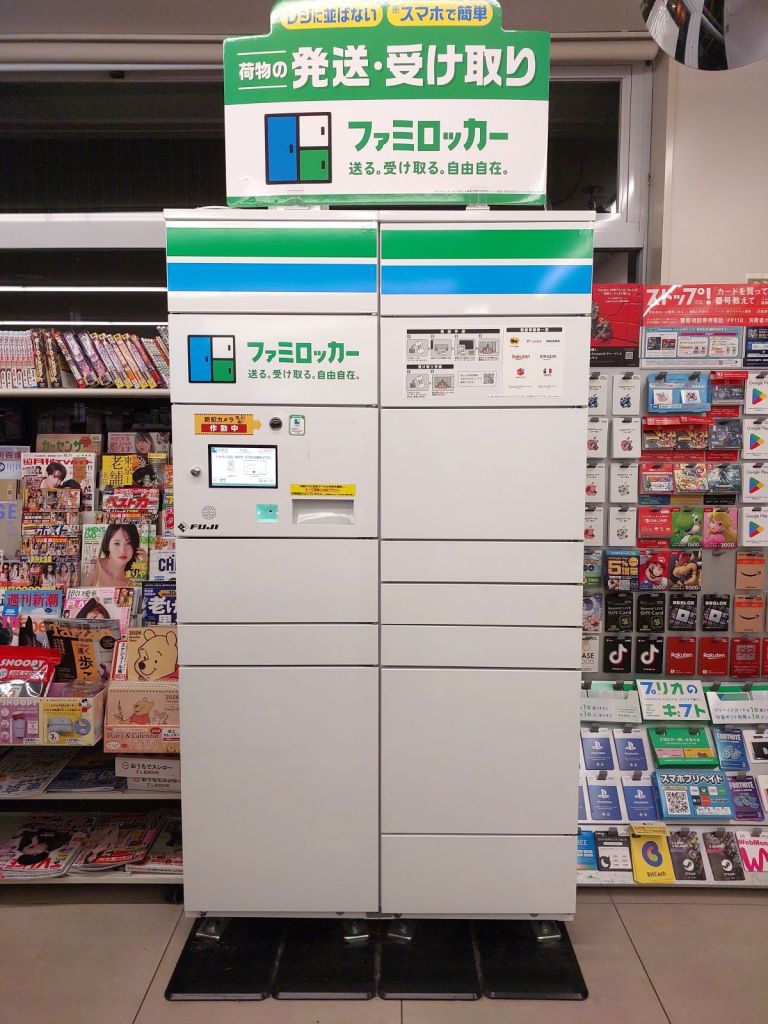
Head to the Family Mart you selected. The FamiLocker is usually near the entrance or along a wall inside. It’s a tall locker unit with a touchscreen interface that looks like this.
📲 Step 2: Scan the QR Code
Bring up the QR code from your Amazon email and scan it at the QR reader of FamiLocker. It’s where the two green lights are, below the main display.

📦 Step 3: Grab your package
A locker door will automatically open with your package inside. Take your item out of the locker and close the door.

✅ Step 4: Tap complete
After you close the door, tap the “☑受取完了” (Complete) button on the screen to finish the process.

Video guide
Here’s an official how-to video from Family Mart showing how quick and hastle-free it really is.
What if there’s no Fami Locker?
FamiLockers are currently available in about 650 Family Mart stores in Tokyo and neighbouring prefectures.
If your chosen Family Mart doesn’t have a FamiLocker, you can still pick up your order at the counter. Amazon will send you a link to a barcode, but here’s the difference:
- the barcode expires every 10 minutes, so you’ll need an internet connection to refresh it if needed.
- you need to queue up at the counter and show the barcode to the staff.
This post is about Family Mart because their locker system is so swift, but Lawson also offers Amazon pickups via a pick-up barcode at the counter.
Conclusion
If you’re traveling in Japan and staying in Tokyo, Amazon + FamiLockers are a fantastic way to shop. You can save time tracking down items on your shopping list, and you won’t need to ask your hotel if they’re happy to hold your package.
Picking up your Amazon order from a Family Mart FamiLocker is incredibly simple and quick—all you need is the QR code from your email. No talking to staff, no ID, no fuss.
While the lockers may go into maintenance mode on Mondays between 2:20 am and 6:00 am, you can pick up your delivery almost anytime—making it a stress-free way to stay in control of your order throughout your trip.

Official webpage about FamiLockers:




Leave a Reply